

E-invoicing: An overview of the XRechnung and ZUGFeRD formats
In Germany, there are essentially two formats for a valid e-invoice. This article explains the difference between XRechnung and ZUGFeRD, outlines which profiles are recognised, and helps you choose between them.
Introduction
An e-invoice must be in a structured format in accordance with the European standard EN 16931. In practice, you will come across two formats: XRechnung as a pure XML file and ZUGFeRD as a PDF with embedded data. We ensure that the format is correct during processing and advise you on which to choose.
A few clarifications first, as there are often misunderstandings regarding the formats:
You do not need to be proficient in both formats. For sending invoices, one format that is compatible with your invoicing software is usually sufficient.
Nor do you need to commit to a format that your recipients cannot read. Both formats comply with the same standard and contain the same core data. The difference lies in the external form, not in the legal content.
This article introduces the two formats, explains the ZUGFeRD profiles and the current versions, and provides guidance on which to choose.
Both comply with the same standard
XRechnung and ZUGFeRD are not competitors in the sense of ‘right or wrong’. Both are e-invoicing formats recognised by the legislator and are based on the EN 16931 standard.
This standard specifies which data fields an invoice must contain and how they are structured. XRechnung and ZUGFeRD simply implement these fields in different ways. Software that processes one format can usually handle the other as well.
For you, this means that whether an incoming invoice arrives as an XRechnung or as a ZUGFeRD makes no difference to its validity. Both are genuine e-invoices.
XRechnung: the pure XML file
XRechnung is a plain XML file. It contains only the structured data, without a human-readable representation of the invoice.
When opened in a text editor, an XRechnung looks like code – lines of data fields and values.
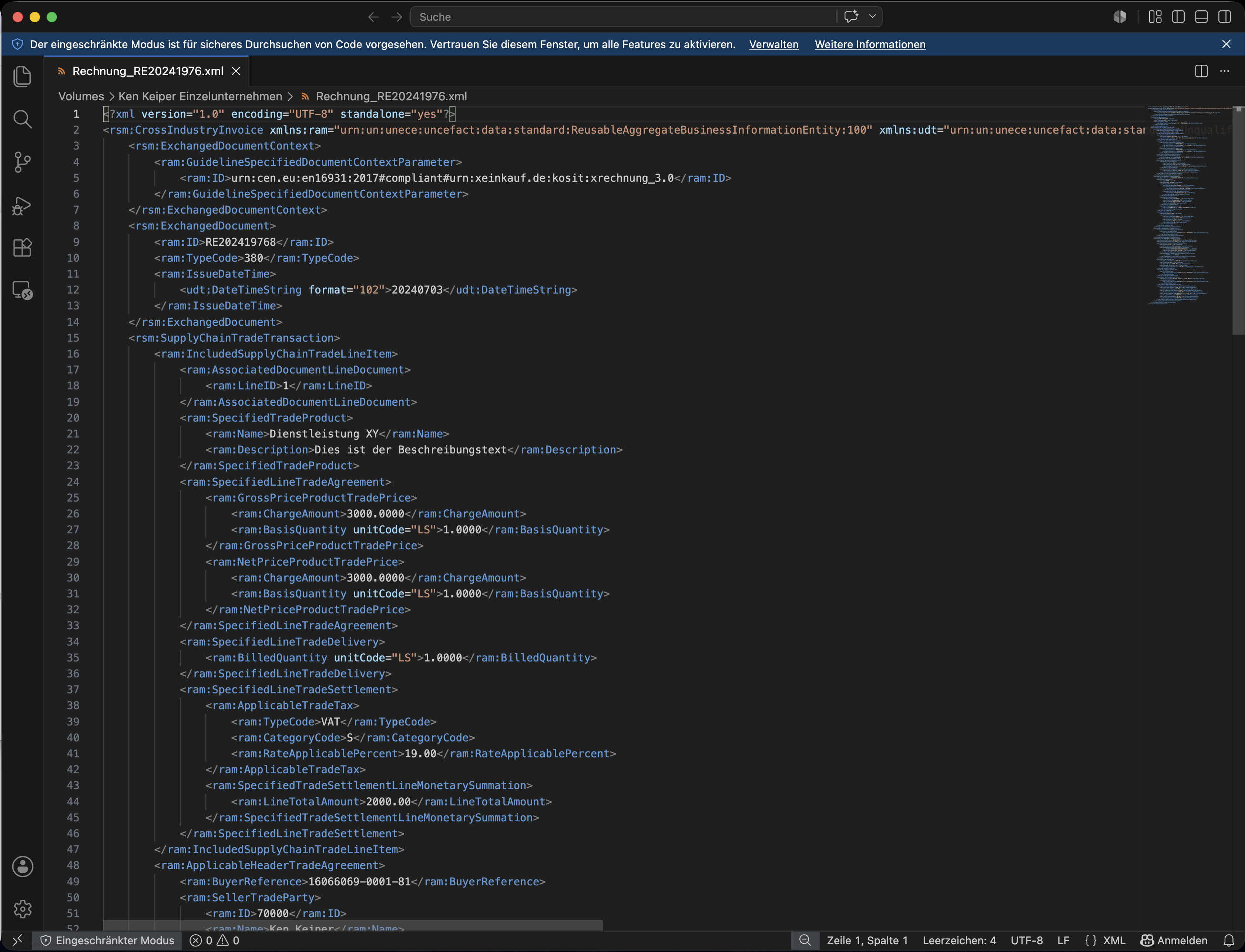
The XRechnung consists of a structured data set that is difficult to read at first glance.
Disadvantage: It is difficult for the human eye to read without tools; a viewer displays it on a single page. We will cover how to make an XRechnung readable in a separate section.
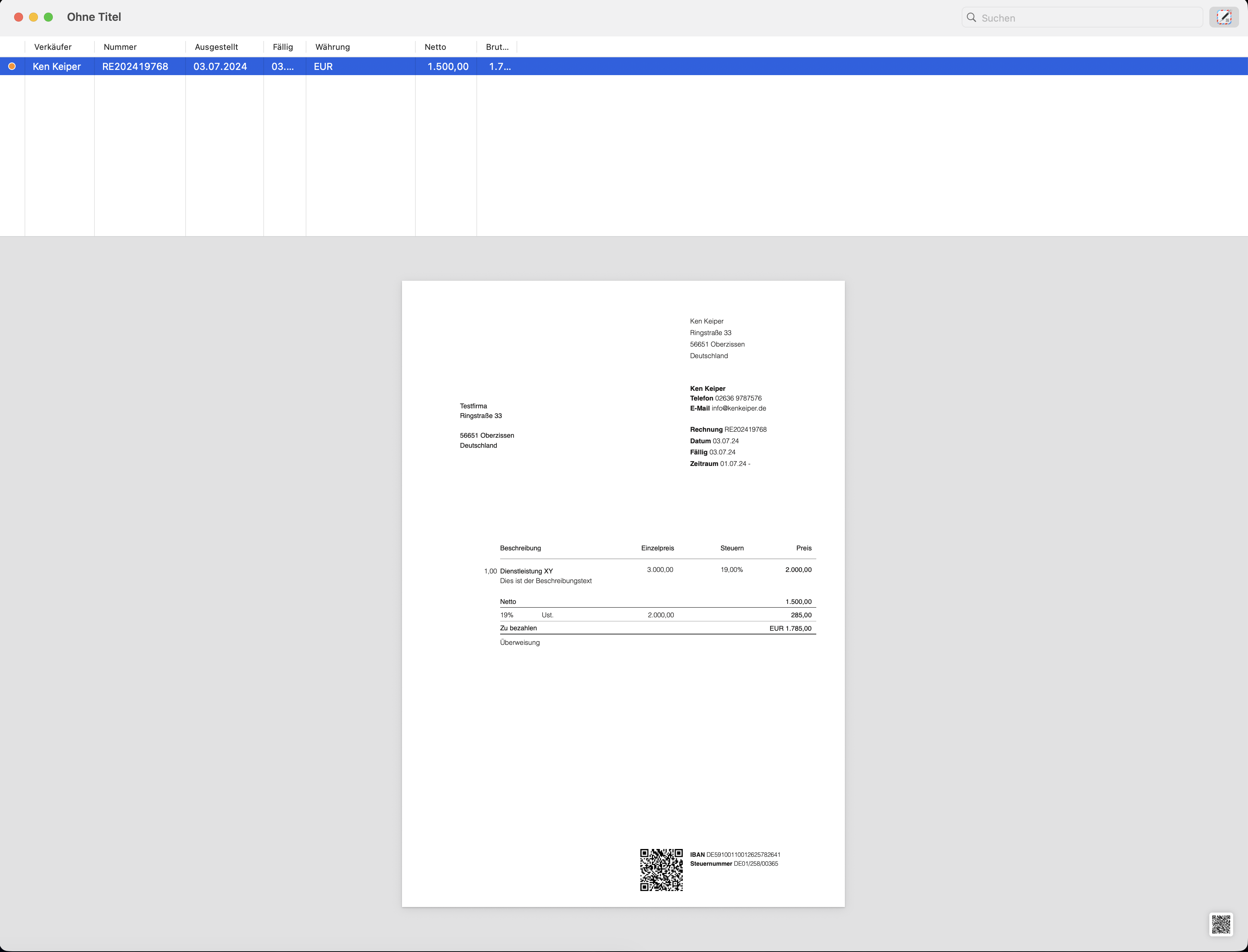
With the help of a viewer, XRechnungen can be displayed and formatted for human reading. Such viewers are now integrated into almost all document management and accounting tools (DATEV Unternehmen Online, Tabula, Lexware Office, etc.). However, there are also some free viewers that can be downloaded separately (for example, the ‘InvoiceViewer’ from GrandTotal for Mac OS).
XRechnung is particularly widespread in dealings with public authorities. Many public sector clients require invoices to be submitted as XRechnung.
For invoices sent to public authorities, the so-called ‘Leitweg-ID’ also applies; we explain this in a separate article.
ZUGFeRD: PDF with embedded data
ZUGFeRD is a hybrid format. Outwardly, it is a standard PDF that you can view on screen or print out just like any other. A structured XML data record is also embedded within this PDF.
ZUGFeRD thus combines the best of both worlds: people see the readable invoice, whilst the software reads the hidden data record. This is precisely why ZUGFeRD is often the pragmatic choice in business-to-business transactions – recipients without specialised software can still view the PDF.
A ZUGFeRD file looks like a normal PDF. You cannot tell from its appearance whether it contains structured data; this can only be determined using your software or a validation tool. A normal PDF without an embedded data record is not an e-invoice, even if it looks identical.
In comparison
Structure: pure XML file (extension .xml)
Readability: only visible on screen via a viewer
Typical use: invoices to public authorities (B2G), increasingly also B2B
Distinctive feature: usually includes a routing ID when sent to public authorities
Structure: PDF with embedded XML data set
Readability: readable like a normal PDF; data set is hidden
Typical use: Business-to-business (B2B) transactions
Special feature: the embedded XML section is the legally binding part
Both formats meet the legal requirements. The choice depends on who you are invoicing and what your recipients expect.
The ZUGFeRD profiles
ZUGFeRD is available in several profiles, which differ in the scope of the data they contain. Not every profile is considered a fully-fledged e-invoice.
According to the tax authorities’ guidelines, ZUGFeRD versions 2.0.1 and above generally meet the requirements – with the exception of the MINIMUM and BASIC-WL profiles. These two do not contain all the mandatory details and are therefore not considered e-invoices for the purposes of the legal obligation.
| Profile | Valid as an e-invoice? | Brief description |
|---|---|---|
| MINIMUM | No | only a greatly reduced core data set |
| BASIC-WL | no | without invoice line items, used solely as a posting aid |
| BASIC | yes | Basic data including items |
| EN 16931 (COMFORT) | yes | Complete data set in accordance with the standard, standard choice |
| EXTENDED | Yes | extended fields, e.g. for sub-items |
In most cases, the EN 16931 profile is the safe choice. If you need to create more complex invoices with sub-items – for example, in the trades or for service packages – the EXTENDED profile is a good choice. The profile your software generates is usually pre-set; if in doubt, we can sort this out together.
Current versions
The formats are maintained and further developed. In practice, it is sufficient to work with a current version – your software usually ensures this.
The current valid version of XRechnung is 3.0.2, supplemented by regular correction packages from the responsible body, KoSIT. A major subsequent version (XRechnung 4.0) has been announced for the second half of 2026, but is not yet in force. Anyone using XRechnung 3.0.2 today is up to date.
Version 2.4 of ZUGFeRD has been in force since 15 January 2026. It complies with the EN 16931 standard and now also allows VAT-compliant sub-items in the EXTENDED profile.
If you create your invoices using accounting or invoicing software, you do not need to worry about the versions yourself. The providers update the formats; an update runs in the background. If in doubt, check with your provider to see whether the current version is supported.
Which format is right for you
The choice depends primarily on who you are invoicing.
If you’re invoicing public authorities, there’s usually no getting round XRechnung, as many public sector clients require this format.
If you’re invoicing other businesses, ZUGFeRD is often the practical choice, as the recipient can view the PDF even without specialist software.
On the receiving end, you don’t need to make a decision in advance anyway. Your software processes both formats; it’s up to the supplier to specify which one they send.
In most cases, therefore, one format is sufficient for sending, and the ability to receive both is all that is needed. If a recipient expressly requests a specific format, we comply with that request.
Common sources of error
- Invalid profile sent: A ZUGFeRD file is issued in the MINIMUM or BASIC-WL profile. These profiles are not recognised as e-invoices, meaning the invoice fails to meet the requirements.
- A standard PDF mistaken for a ZUGFeRD: A PDF without an embedded data record is sent as an e-invoice. It looks like a ZUGFeRD, but contains no structured data and is not an e-invoice.
- Format selected that the recipient cannot handle: A standard XRechnung is sent to a recipient who can only open PDFs. Without a viewer, they cannot read the invoice, which triggers queries.
- Outdated format version: The software generates an outdated version. This can lead to error messages during validation or at the recipient’s end, even though the content is correct.
- XML section in ZUGFeRD modified: Changes are made to the PDF retrospectively without updating the embedded data record. The PDF and the data record then differ from one another.
Frequently asked questions
Do I need to support both formats?
No. For sending, one format that suits your recipients is usually sufficient. You should be able to receive both, but your software will handle that.
Which format is better?
Neither is inherently better. XRechnung is the standard choice for public authorities, whilst ZUGFeRD is often the practical choice when dealing with businesses, as the PDF can be read without specialist software.
Isn’t ZUGFeRD just a PDF?
Outwardly, yes, but it contains a hidden structured data record. It is this data record that makes ZUGFeRD an e-invoice. A PDF without this data record is not an e-invoice.
Which version of ZUGFeRD should I use?
A current version – currently ZUGFeRD 2.4 – in the EN 16931 or EXTENDED profile. Your software will usually handle the version for you.
Do I need to do anything about XRechnung 4.0?
Not at the moment. XRechnung 4.0 has been announced but is not yet in force. Anyone using XRechnung 3.0.2 is up to date and will only switch over once it is officially released.
Which profile do I need for my trade?
If you include service packages or sub-items, the EXTENDED profile is suitable, as it supports these in a VAT-compliant manner. For simple invoices, EN 16931 is sufficient.
Can I even read an XRechnung?
Not without a tool – it’s pure code. A viewer is needed to display it on a page. We explain how to do this in a separate article. \[Link zu einem Hilfsartikel]
Legal notice
This article provides an overview and is not a substitute for individual advice. The scope of functions, format versions and menu navigation may change as a result of updates; the current version is always the authoritative one.
If you have any questions about choosing a format for your invoices, please contact us directly.
Last updated: June 2026