

E-invoices: Opening e-invoices and making them readable
When you first open an XRechnung, it looks like a jumble of code – but that doesn’t mean it’s faulty. This article shows you how to view an e-invoice.
Introduction
E-invoices contain their data in a structured format. This is designed for machine processing, not for the human eye – which is why an XRechnung appears incomprehensible in a basic text editor. To ensure you can still view an incoming invoice, there are simple methods, which we’ll demonstrate here.
A few clarifications first, as there are often misunderstandings here:
An XML file that looks like code is not ‘broken’ or unusable. It contains the same invoice as a PDF, just in a machine-readable format.
Nor do you always need a specialised tool. You can open a ZUGFeRD invoice just like any ordinary PDF, and your accounting software displays incoming e-invoices in a readable format anyway.
This article explains the two formats when opening them, the tax authorities’ free viewer and what your software handles.
Why an XRechnung initially appears unreadable
An XRechnung is a pure XML file. If you open it in a text editor, you’ll see lines of data fields and angle brackets – difficult for humans to read.
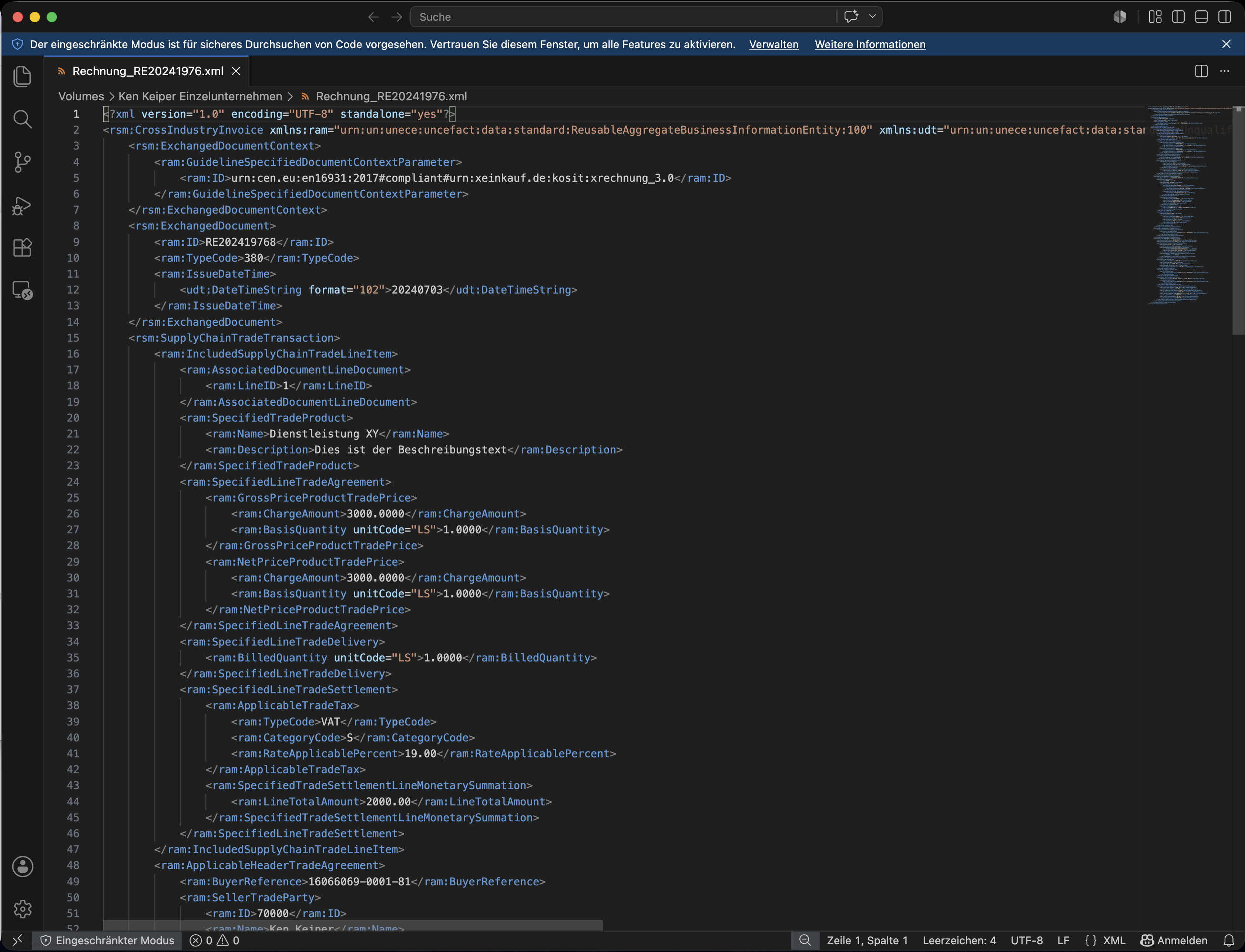
The XRechnung consists of a structured data set that is difficult to read at first glance.
This is not a fault, but the very purpose of the format. The data is organised in such a way that a programme can unambiguously map each field.
It is only display software, known as a ‘viewer’, that translates these fields into a readable invoice layout on a page.
We explain what distinguishes an e-invoice from a PDF in our introductory article.
ZUGFeRD: opens in a standard PDF viewer
A ZUGFeRD invoice looks like a standard PDF. You can open it with any PDF programme and immediately see the familiar invoice layout with letterhead, line items and totals.
Embedded within this PDF is also a structured data set that you cannot see. You do not need it simply to read the invoice; your software reads it in the background. That is why you do not usually need a separate tool for ZUGFeRD.
Do not confuse a ZUGFeRD PDF with a standard PDF. They both look the same, but only the ZUGFeRD file contains the structured data. When forwarding documents to us, please ensure you always send the original file – not a new printout or a PDF that has been saved again.
Making XRechnung readable: the tax authorities’ free viewer
To ensure that nobody is forced to rely on an expensive solution even without their own software, the tax authorities provide a free e-invoice viewer via the ELSTER portal (link). You upload your file and receive a readable display in your browser.
The viewer displays both XRechnungen (.xml) and ZUGFeRD invoices (.pdf) whilst checking their structure. It is accessible online without the need for installation and, as a service provided by the tax authorities, is a trustworthy resource.
-
Open the e-invoice viewer
Access the tax authorities’ viewer via the ELSTER portal (available at elster.de in the ‘E-Rechnung’ section).
-
Upload the file
Select the e-invoice from your device – either an XRechnung with the .xml extension or a ZUGFeRD file with the .pdf extension.
-
You will see the readable display
The viewer converts the structured data into a clear, organised view, allowing you to check all the invoice details on a single page.
Do not upload sensitive invoice data to just any internet service. Anyone using a third-party website is handing over data on customers, services and amounts. The tax authority’s viewer processes the data on the tax administration’s servers and is therefore the secure choice.
Note on usage: The ELSTER Viewer displays the invoice but does not offer its own download or print function. If you need a view that can be saved, other official tools such as the Validator at erechnungsvalidator.service-bw\.de generate a downloadable HTML version.
What your software handles anyway
In most cases, you do not need a separate viewer. Accounting or invoicing software recognises incoming e-invoices and displays them automatically in a readable format.
We also make an incoming e-invoice visible as part of the processing procedure as soon as we receive it. The tax authority’s viewer is therefore particularly useful if you wish to quickly view a single XRechnung yourself without having to load it into a programme.
Common sources of error
- XML mistaken for a corrupted file: An XRechnung appears incomprehensible in the editor and is mistaken for a corrupted file. In fact, it is correct; only a viewer makes it readable.
- Creating a new file from the view: A new PDF is saved from the readable display and forwarded. The structured data is missing from this, meaning it is no longer an e-invoice.
- Uploading sensitive data to third-party services: An invoice is uploaded to any website for display. The operator can view the contents; the official viewer is the secure alternative.
- ZUGFeRD processed twice: A ZUGFeRD PDF is sent through a viewer, even though it can be opened directly. This is unnecessary and may result in a file without embedded data.
Frequently asked questions
My XRechnung looks like code – is it faulty?
No. An XRechnung is an XML file and is, by its very nature, difficult to read in an editor. Using a viewer, such as the free one provided by the tax authorities, it can be viewed on a single page.
How much does the tax authorities’ e-invoice viewer cost?
Nothing. It is provided free of charge via the ELSTER portal and does not require installation.
Do I need a viewer for ZUGFeRD?
No. You open a ZUGFeRD invoice just like any PDF. The embedded data record is read by your software in the background.
Can I save the view from the viewer?
The ELSTER viewer displays the invoice but does not have its own save or print function. Other official tools, such as the validator at erechnungsvalidator.service-bw\.de, generate a downloadable HTML view.
Can I upload invoices to any website for display?
We advise against this. Such services can see your customer and turnover data. Please use the tax authority’s viewer, which processes the data on official servers.
Do I even have to open the invoice myself?
You can, but you don’t have to. Your software displays incoming e-invoices, and we make them visible during processing. It is important that you forward the original file to us.
How can I tell whether I’ve received an XRechnung or a ZUGFeRD?
By the file extension. An XRechnung ends in .xml, a ZUGFeRD invoice in .pdf. We explain separately which format is intended for what. \[Link zu einem Hilfsartikel]
Legal notice
This article provides an overview and is not a substitute for individual advice. The functionality and names of the tools mentioned may change due to updates; the current version is always the authoritative one.
If you have any questions about opening or forwarding your e-invoices, please contact us directly.
As at: June 2026